Z3X BOX Samsung Tool PRO V 26.8 Setup Download

Z3X BOX Samsung Tool PRO 26.8 World first, tar file partially flashing 

Main GUI changes today is:

Now after choice tar file you can select what part(parts) of tar file will be flashed.
No more need do unpack tar file etc.

New phones:

- NEW unlock algo G920T, G925T, G928T, N920T, T817T ...
(fix error 8, 9) - support all version till now

- support SM-A800J (Flashing, Unlock, Read codes, Read/WriteCERT, Read/Write EFS, Reset FRP, Repair, reboot to download/recovery, Reset MSL)
- support SCV32 (Flashing, Unlock(test), Read codes(test), Read/WriteCERT, Read/Write EFS, Reset FRP, Repair, reboot to download/recovery, Reset MSL)

- support SM-G550T (Flashing, Unlock, Read/Write EFS, Reset FRP, Repair, reboot to download/recovery, Reset MSL)
- support SM-G550T1 (Flashing, Unlock, Read/Write EFS, Reset FRP, Repair, reboot to download/recovery, Reset MSL) - First in the world
- support SM-G550T2 (Flashing, Unlock, Read/Write EFS, Reset FRP, Repair, reboot to download/recovery, Reset MSL) - First in the world

Addition function added:
- A310F (Reset MSL)
- A310FD (Reset MSL)
- A310M (Reset MSL)
- A310MD (Reset MSL)
- A310N0 (Reset MSL)
- A310Y (Reset MSL)
- A5108 (Reset MSL)
- A510F (Reset MSL)
- A510FD (Reset MSL)
- A510K (Reset MSL)
- A510L (Reset MSL)
- A510M (Reset MSL)
- A510MD (Reset MSL)
- A510S (Reset MSL)
- A510Y (Reset MSL)
- A7108 (Reset MSL)
- A710F (Reset MSL)
- A710FD (Reset MSL)
- A710K (Reset MSL)
- A710L (Reset MSL)
- A710M (Reset MSL)
- A710S (Reset MSL)
- A710Y (Reset MSL)
- A800F (Reset MSL)
- A800I (Reset MSL)
- A800IZ (Reset MSL)
- A800S (Reset MSL)
- G150N0 (Reset MSL)
- G150NK (Reset MSL)
- G150NL (Reset MSL)
- G150NS (Reset MSL)
- G155S (Reset MSL)
- G389F (Reset MSL)
- G5500 (Reset MSL)
- G550F (Reset MSL)
- G550FY (Reset MSL)
- G850K (Reset MSL)
- G850L (Reset MSL)
- G850S (Reset MSL)
- G890A (Reset MSL)
- G903F (Reset MSL)
- G903M (Reset MSL)
- G903W (Reset MSL)
- G920A (Reset MSL)
- G920AZ (Reset MSL)
- G920F (Reset MSL)
- G920FD (Reset MSL)
- G920FQ (Reset MSL)
- G920I (Reset MSL)
- G920K (Reset MSL)
- G920L (Reset MSL)
- G920S (Reset MSL)
- G920T (Reset MSL)
- G920T1 (Reset MSL)
- G920W8 (Reset MSL)
- G925A (Reset MSL)
- G925F (Reset MSL)
- G925FQ (Reset MSL)
- G925I (Reset MSL)
- G925K (Reset MSL)
- G925L (Reset MSL)
- G925T (Reset MSL)
- G925W8 (Reset MSL)
- G9287 (Reset MSL)
- G9287C (Reset MSL)
- G928A (Reset MSL)
- G928C (Reset MSL)
- G928F (Reset MSL)
- G928G (Reset MSL)
- G928I (Reset MSL)
- G928K (Reset MSL)
- G928L (Reset MSL)
- G928N0 (Reset MSL)
- G928S (Reset MSL)
- G928T (Reset MSL)
- G928W8 (Reset MSL)
- G930F (Reset MSL)
- G930FD (Reset MSL)
- G930K (Reset MSL)
- G930L (Reset MSL)
- G930S (Reset MSL)
- G930W8 (Reset MSL)
- G935F (Reset MSL)
- G935FD (Reset MSL)
- G935K (Reset MSL)
- G935L (Reset MSL)
- G935S (Reset MSL)
- G935W8 (Reset MSL)
- J120A (Reset MSL)
- J120AZ (Reset MSL)
- J120F (Reset MSL)
- J120FN (Reset MSL)
- J120G (Reset MSL)
- J120W (Reset MSL)
- J120ZN (Reset MSL)
- J200BT (Reset MSL)
- J200F (Reset MSL)
- J200G (Reset MSL)
- J200GU (Reset MSL)
- J200M (Reset MSL)
- J200Y (Reset MSL)
- J320A (Reset MSL)
- J320AZ (Reset MSL)
- J321AZ (Reset MSL)
- J700F (Reset MSL)
- J700H (Reset MSL)
- J700M (Reset MSL)
- J700T (Reset MSL)
- J700T1 (Reset MSL)
- J7108 (Reset MSL)
- J710F (Reset MSL)
- J710FN (Reset MSL)
- J710GN (Reset MSL)
- J710K (Reset MSL)
- J710MN (Reset MSL)
- N910K (Reset MSL)
- N910L (Reset MSL)
- N910S (Reset MSL)
- N916K (Reset MSL)
- N916L (Reset MSL)
- N916S (Reset MSL)
- N9208 (Reset MSL)
- N920A (Reset MSL)
- N920C (Reset MSL)
- N920F (Reset MSL)
- N920G (Reset MSL)
- N920I (Reset MSL)
- N920K (Reset MSL)
- N920L (Reset MSL)
- N920S (Reset MSL)
- N920T (Reset MSL)
- N920W8 (Reset MSL)
- T375L (Reset MSL)
- T375S (Reset MSL)
- T3777 (Reset MSL)
- T377V (Reset MSL)
- T585 (Reset MSL)
- T587 (Reset MSL)
- T677 (Reset MSL)
- T677NL (Reset MSL)
- T715 (Reset MSL)
- T715C (Reset MSL)
- T715N0 (Reset MSL)
- T715Y (Reset MSL)
- T815C (Reset MSL)
- T815N0 (Reset MSL)
- T815Y (Reset MSL)
- T817 (Reset MSL)
- T817P (Reset MSL)
- T817T (Reset MSL)
- T817W (Reset MSL)

GUI changes:
-Search files in history now are optional

Setup Download

Fixed:
- files list in history tab
- GUI fixes
- Port box visibility
- abbreviation of presets list

FURIOUS GOLD PACK5 QCOM SMART TOOL News

FURIOUS GOLD [PACK5] QCOM SMART TOOL - Update 1.0.0.10454 - CHAMPIONS EDITION 

What's new ?!

[x] ONETOUCH PIXI 7 / OT-9006W T-MOBILE DIRECT UNLOCK [FIREHORSE MODE]
[x] ONETOUCH PIXI 3 (7) / OT-9007 EE DIRECT UNLOCK [FIREHORSE MODE]
[x] ONETOUCH GO PLAY / OT-7048 DIRECT UNLOCK [FIREHORSE MODE]
[x] ONETOUCH POP 7 LTE / OT-9015W DIRECT UNLOCK [FIREHORSE MODE]
[x] ONETOUCH FLINT / OT-5054O CRICKET DIRECT UNLOCK [ADB MODE]
[x] IMPROVED UNLOCK PROCESS FOR ALL THE SUPPORTED MODELS
[x] PALM PRE 3 / HP VEER DIRECT UNLOCK
[x] BLADE 3 - VIRGIN_P772N10V1.0.0B07 - DIRECT UNLOCK

BANGLADESH VS ENGLAND 3RD ODI LIVE STREAMING

BANGLADESH VS ENGLAND 3RD ODI LIVE STREAMING

CLICK TO SEE LIVE 

BANGLADESH VS ENGLAND 3RD ODI LIVE NOW


SEE LIVE NOW

Z3X BOX LG 2-3G Tool 9.24 Setup Download

Z3X BOX Lg 2-3G Tool 9.24. LG K3 LTE, Stylo 2, G Pad X 8.0, G pad III 8.0 and Sprint...

Added:

- support K100DS (read unlock codes, imei repair, flashing, firmware maker, read/write security zone, screen lock reset, frp reset) - world first!
- support K550 (imei repair, flashing, firmware maker, qcn read/write, nvm read/write, sec zone read/write/reset in flash/adb mode, FRP reset, screen lock reset) - world first!
- support V520 (direct unlock in test mode, imei repair, flashing, firmware maker, qcn read/write, nvm read/write, sec zone read/write/reset in flash/adb mode, FRP reset, screen lock reset) - world first!
- support V522 (direct unlock in test mode, imei repair, flashing, firmware maker, qcn read/write, nvm read/write, sec zone read/write/reset in flash/adb mode, FRP reset, screen lock reset) - world first!

and we add unlock for Sprint phones in test mode:
- support LS665 (direct unlock in test mode, flashing, firmware maker, qcn read/write, nvm read/write, sec zone read/write/reset in flash/adb mode, FRP reset, screen lock reset)
- support LS675 (direct unlock in test mode, flashing, firmware maker, qcn read/write, nvm read/write, sec zone read/write/reset in flash/adb mode, FRP reset, screen lock reset)
- support LS751 (direct unlock in test mode, flashing, firmware maker, qcn read/write, nvm read/write, sec zone read/write/reset in flash/adb mode, FRP reset, screen lock reset)
- support LS770 (direct unlock in test mode, flashing, firmware maker, qcn read/write, nvm read/write, sec zone read/write/reset in flash/adb mode, FRP reset, screen lock reset)
- support LS775 (direct unlock in test mode, flashing, firmware maker, qcn read/write, nvm read/write, sec zone read/write/reset in flash/adb mode, FRP reset, screen lock reset)
- support LS980 (direct unlock in test mode, flashing, firmware maker, qcn read/write, nvm read/write, sec zone read/write/reset in flash/adb mode, FRP reset, screen lock reset)
- support LS990 (direct unlock in test mode, flashing, firmware maker, qcn read/write, nvm read/write, sec zone read/write/reset in flash/adb mode, FRP reset, screen lock reset)
- support LS991 (direct unlock in test mode, flashing, firmware maker, qcn read/write, nvm read/write, sec zone read/write/reset in flash/adb mode, FRP reset, screen lock reset)
- support LS992 (direct unlock in test mode, flashing, firmware maker, qcn read/write, nvm read/write, sec zone read/write/reset in flash/adb mode, FRP reset, screen lock reset)
- support LS995 (direct unlock in test mode, flashing, firmware maker, qcn read/write, nvm read/write, sec zone read/write/reset in flash/adb mode, FRP reset, screen lock reset)
- support LS996 (direct unlock in test mode, flashing, firmware maker, qcn read/write, nvm read/write, sec zone read/write/reset in flash/adb mode, FRP reset, screen lock reset)

Asansam box Version 3.1.5 Setup Download

Asansam box Version 3.1.5 Released


Add

New Method

FOR

Reset FRP

Samsung 2016 Phones

-Need active ADB For reset FRP
- You must Flash sboot + boot Files OR Combination Firmware For Active ADB
-Need Factory Reset and Write Stock Firmware after reset

FOR S7 EXYNOS PHONES

FOR OTHER PHONES

NEW ASANSAMBOX Can also Activate on Following Infinity Team Products:

- Main Infinity-Box
- Infinity-Box Dongle
- Infinity-Box [BEST]
- Infinity-Box CDMA-Tool

Hua team resellers

infinity Resellers

New Asansam Software Download

DOWNLOAD

UNISTALL ALL ABOUT HST IN CP AND REMOVE HST FOLEDER IN C:/ BEFORE INSTALL

NEW GUI
NEW TEAM
NEW TOOLS
NEW METHOD
NEW SOLUTION
NEW UPDATES

Now it's our turn

HUA DONGLE
HUABOX POWERED WITH HUA TEAM

BR
HUA TEAM

Volcano Box 3.0 aka Inferno Setup Download

VolcanoBox MTK V1.0Ka
VolcanoBox SPD V1.0Aa Beta

Released For VolcanoBox Users
Released For Merapi Users
Released For Inferno Key Users

NO MORE DOG FILE FOR ACTIVATION

As requested by many we have changed our security system so you won't need in future to send us the Dogfile generated on your computer for activations.

like us on Facebook : 
https://www.facebook.com/welcomezone.co.in?ref=hl

$$$$$$$$ Win 3 month of inferno activation $$$$$$$$

Important notice about "Update Failed" - [Click to open]

All users please BE WARE. - [Click to open]

Important notice about "30xxxxxx1006" - [Click to open]

Downlaod Area: Index of ./VolcanoBox/Inferno - VolcanoBox 3.

Important Threads you may Interested.
To early My Friend !!
Inferno Manual
VOLCANO 3.0 aka INFERNO - All Importants Details- FAQ - Manual - Ticks etc

Success Fully Repaired Stories
All World First Read|Write|Format|Frp Reset Etc With VOLCANO 3.0 aka INFERNO
other boxes Failed and Inferno Success

BUY NOW :

* VOLCANO BOX FULLY ACTIVATED : 129 USD only
* VOLCANO DONGLE ( Inferno ) : 69 USD only
BUY THE BEST... BE THE BEST 

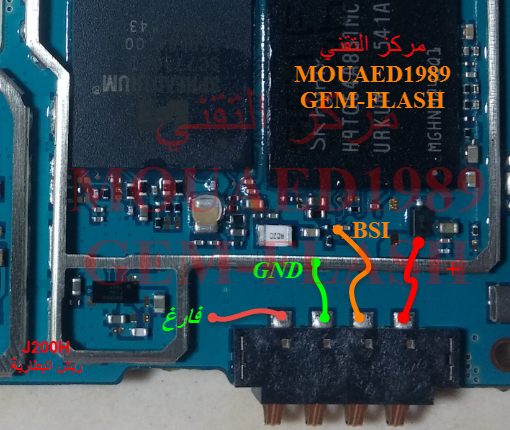
Samsung Galaxy J2 Battery Connector Terminal Jumper Ways

Samsung Galaxy J2 Battery Connector Terminal Jumper Ways


Problem:-

Samsung Galaxy J2 Dead Solution


Samsung Galaxy J2 Battery Track Ways


Samsung Galaxy J2 Battery Connector Jumper


Samsung Galaxy J2 Terminal Jumper Ways


[caption id="attachment_19219" align="alignnone" width="300"]Samsung Galaxy J2 Battery Connector Terminal Jumper Ways Samsung Galaxy J2 Battery Connector Terminal Jumper Ways[/caption]
Diagnostics:-

If Samsung Galaxy J2 is not getting power ON, Replace the battery and try to power it ON. Plug in charging pin into jack and try to make it charge. Check batter terminal's +v and -V points with electronics meter.

Solution:-

Dis assemble the phone Samsung Galaxy J2 and check battery connectors if these are lose or not fix. Then check the whole mother board for water and rust damages, Carbon or broken parts.

If find some rust or carbon make it clean with electronics cleaner and apply hot air with heat gun to make it dry.

Find out these parts that are identified in above diagram and make check for volts. If find some broken parts or tracks are missing then apply jumpers as given in above diagrams.

Samsung Galaxy J2,Nokia,Battery Terminal,Battery Points,Battery Jack Problem,Battery Terminal Solution,Battery Terminal Jumpers,Battery Power Ways


Samsung Galaxy J2, Battery Consume, Battery Terminal, Battery Terminal Jumpers, Battery Terminal Solution,Battery Connector , Battery Connector Jumpers, Battery Connector Solution,